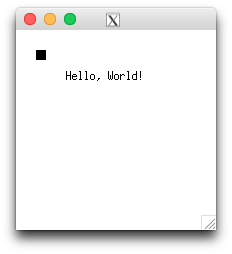
If you want to run for example 2D vector application like InkScape (https://inkscape.org) on your Mac you need to install X11.
(Read more on that here: https://inkscape.org/en/download/mac-os/)
/usr/X11R6/
/usr/X11R6/lib/
/usr/X11R6/include/X11/
/*
  * Simple Xlib application drawing a box in a window.
  * gcc input.c -o output -lX11
  */

/* /1/ */
#include <X11/Xlib.h>
#include <stdio.h>
#include <stdlib.h>
#include <string.h>

int main(void)
{
    Display *display;
    Window window;
    XEvent event;
    char *msg = "Hello, World!";
    int s;

    /* /2/ some basic X11 setup */
    /* open connection with the server */
    display = XOpenDisplay(NULL);
    if (display == NULL)
    {
        fprintf(stderr, "Cannot open display\n");
        exit(1);
    }

    s = DefaultScreen(display);

    /* create window */
    window = XCreateSimpleWindow(display, RootWindow(display, s), 10, 10, 200, 200, 1,
                           BlackPixel(display, s), WhitePixel(display, s));

    /* select kind of events we are interested in */
    XSelectInput(display, window, ExposureMask | KeyPressMask);

    /* map (show) the window */
    XMapWindow(display, window);

    /* /3/ event loop */
    for (;;)
    {
        XNextEvent(display, &event);

        /* /4/ draw or redraw the window */
        if (event.type == Expose)
        {
            XFillRectangle(display, window, DefaultGC(display, s), 20, 20, 10, 10);
            XDrawString(display, window, DefaultGC(display, s), 50, 50, msg, strlen(msg));
        }
        /* /5/ exit on key press */
        if (event.type == KeyPress)
            break;
    }

    /* /6/ close connection to server */
    XCloseDisplay(display);

    return 0;
 }
/1/ We use X11/Xlib.h basic X11 lib here. #include <X11/Xlib.h>
/2/ Some basic X11 setup, create a X11 window, etc.
/3/ As you can can see, everything interactive is within a so called event loop. It loops forever until something happens: An event.
/4/ Check for event
/5/ Event for exit (break) the event loop, which terminates the event loop, and ...
/6/ ... finally closes the created X window
gcc main.c
main.c:6:10: fatal error: 'X11/Xlib.h' file not found
#include <X11/Xlib.h>
         ^
1 error generated.
$ find /usr/ -name "*Xlib.h"
/usr/X11R6/include/X11/Xlib.h
-> So add /usr/X11R6/include/ to your include path (-I):
-I/usr/X11R6/include/
List undefined (-u) symbols:
$ nm   main.o
 U _XCloseDisplay
 U _XCreateSimpleWindow
 U _XDrawString
 U _XFillRectangle
 U _XMapWindow
 U _XNextEvent
 U _XOpenDisplay
 U _XSelectInput
 U ___stderrp
 U _exit
 U _fprintf
 0000000000000000 T _main
 U _strlen
These Xnnnn functions like XCloseDisplay are X11 functions pointing to X11R6 libs because they are implemented there within the X11 libs.
X11 libs are in /usr/X11R6/lib so add -L Library search path to it (/usr/X11R6/lib) and the library itself (X11) like so:
$ gcc -L/usr/X11R6/lib -lX11 -I/usr/X11R6/include/ main.c
$
A Makefile could look like this:
## -- just for compiling, C needs the path to the .h files
X11_INC_PATH  = -I/usr/X11R6/include/

## -- library
X11_LIBS_PATH = -L/usr/X11R6/lib/
X11_LIBS      = -lX11


default:    main

main:   main.c
    gcc -Wall $(X11_INC_PATH) $(X11_LIBS_PATH) $(X11_LIBS)  main.c -o main


#clean:
#    rm -r main.o main
$ make
$
An a Mac, otool is what ldd is on Linux.
$ otool -L ./main
 ./main:
 /opt/X11/lib/libX11.6.dylib (compatibility version 10.0.0, current version 10.0.0)
 /usr/lib/libSystem.B.dylib (compatibility version 1.0.0, current version 1225.1.1)
$
$ ./main
I replaced KeyPress to KeyRelease to that I can take a screenshot.
if (event.type == KeyRelease)
More on that, see http://tronche.com/gui/x/xlib/events/keyboard-pointer/keyboard-pointer.html
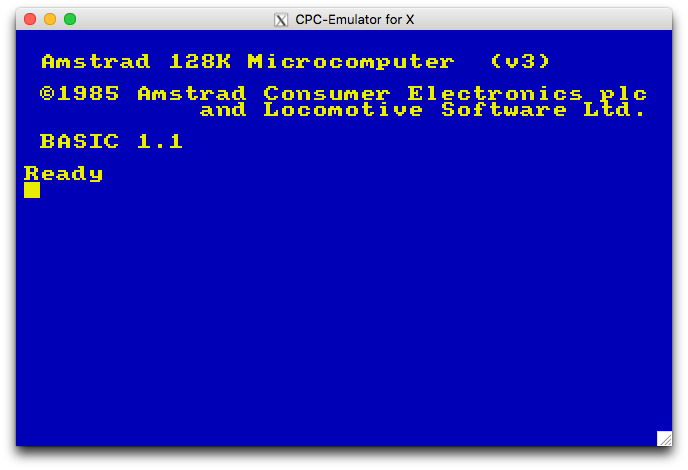
Ported CPC 464 for X11 on OS X: